Canva Candle Label Template: Streamline Your Branding
The End of Design Overwhelm for Candle Makers
If you’ve ever found yourself staring at a blank Canva canvas for hours, trying to conjure the perfect label for your new vanilla-lavender scent, you know the struggle. Designing packaging design is a specialized skill, and it can eat up time you should be spending on wax temperatures, wick testing, and order fulfillment. That’s where a high-quality Canva Candle Label Template changes the game. It isn't just a set of shapes; it’s a strategic design asset built to bridge the gap between a great product and a professional brand image.
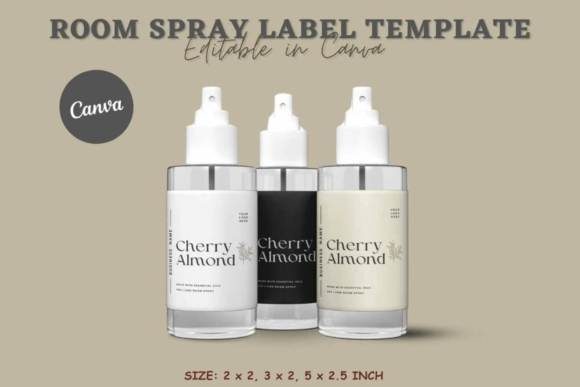
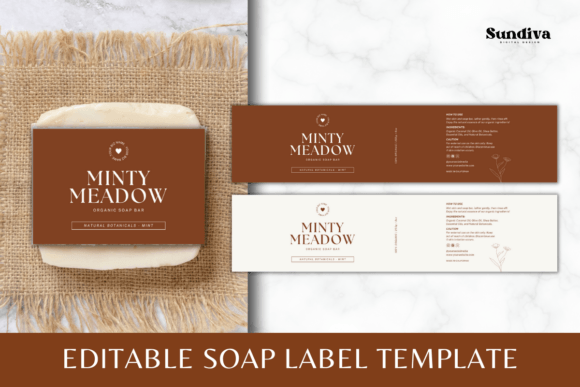
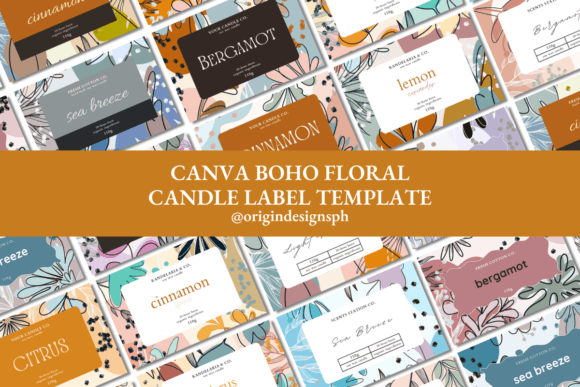
This specific template isn't about locking you into a rigid style. It’s about providing a structured starting point. You get a curated collection of 16 distinct designs, all optimized for the standard 3 x 2 inch label size common in the industry. Think of it as a visual toolkit. Whether your brand personality is rustic and earthy, modern and minimalist, or bold and playful, the variety within this single template pack ensures you aren't trying to force a "one-size-fits-all" approach. It’s the kind of premium font and layout resource that saves you from decision paralysis.
Visual Personality: More Than Just a Pretty Sticker
Let’s talk about the aesthetic. A great candle label needs to do two things: look good on a shelf (or a mantelpiece) and clearly communicate the scent profile. This template pack leans into modern typography principles. You’ll find layouts that balance whitespace with text hierarchy, ensuring the candle name pops while the scent description remains legible. It’s a mix of styles—some layouts might feature elegant script font pairings for a luxurious feel, while others utilize clean sans serif font structures for a contemporary, gender-neutral vibe.
The visual character of these templates is designed for versatility. They aren't so quirky that they become niche, nor so generic that they lack soul. This is crucial for brand identity. When you customize these, you are building a visual language. If you are selling a "Midnight Jasmine" candle, you can lean into the darker, moodier designs included in the pack. For a "Lemon Verbena," you might opt for the lighter, airy layouts. The typeface choices included in the background designs are curated to evoke emotion immediately—a key factor in retail where you have about three seconds to grab a customer's attention.
Practical Application: From Screen to Shelf
So, where does this Canva Candle Label Template actually work best? Beyond the obvious application of sticking it on a jar, these designs are incredibly effective for your broader marketing ecosystem.
First, consider social media graphics. The 3x2 ratio translates well to Instagram feeds and stories. You can use the designs to create mockups or promotional graphics that look cohesive with your physical product. Second, if you are selling on platforms like Etsy or your own website, the label design sets the tone for your web design elements. You can pull colors and font styles from the label to create headers, sale banners, and email newsletters, ensuring total brand consistency.
For the entrepreneurs and small business owners in the audience, consistency is king. Using a template ensures that your "Spring Collection" looks like it belongs next to your "Holiday Collection." It creates a shelf presence that looks established and trustworthy. It’s not just about making a sticker; it’s about packaging design that sells. Even if you are a hobbyist making gifts for friends, using a cohesive template elevates the perceived value of the gift instantly. It turns a homemade craft into a personalized product.
Customization: Making the Template Your Own
The real power of this asset lies in its editability. The listing notes that the background is included, but removable. This is vital. A creative font or a layout is only as good as its ability to adapt to your specific vision.
Here is how to approach the edit process to get the most out of your investment:
- Evaluate Project Fit: Before you change a single color, look at all 16 designs. Which one aligns with the "vibe" of your scent? Don't pick a flowery layout for a "Campfire Smoke" scent. Match the visual style to the olfactory experience.
- Font Pairing: The templates come with pre-selected fonts, but Canva makes swapping them easy. If the template uses a serif font for the header and you want something edgier, swap it for a bold display font. Just ensure the hierarchy remains—the name of the candle should always be the most prominent element.
- Readability Considerations: This is non-negotiable. While a handwritten font looks beautiful, ensure it’s legible at small sizes. Test your design by zooming out. If you can't read the scent notes quickly, simplify the typography.
- Color Theory: Use the eyedropper tool in Canva to match the label background to the color of your wax or the lid of your jar. This creates a unified, high-end look that signals professionalism.
Technical Workflow and Quality Control
There is a technical side to packaging design that beginners often overlook. The instructions mention downloading on a computer to prevent resolution loss. This is a golden rule for print assets. Mobile apps are great for quick edits, but the export settings for high-DPI printing are best managed on a desktop.
When you are ready to print, remember that what you see on your screen is backlit RGB color. Printers use CMYK. The colors will likely shift slightly. This is where the "DIY" aspect requires patience. Do a test print on plain paper first. Cut it out and tape it to your jar. Does the white text disappear against the candle? Is the contrast high enough?
Also, think about the finish. A matte label conveys a modern, organic feel, while a gloss finish feels more traditional and luxurious. The design assets you choose in this template will look different depending on the paper stock. A busy, textured background design might get lost on a textured matte paper, so opt for cleaner layouts if you choose that stock.
The Strategic Advantage for Starters and Pros
For beginners, the value is obvious: you get a professional look without hiring a designer. It allows you to test the market, launch a product line quickly, and iterate without breaking the bank. You can focus your capital on better fragrance oils rather than expensive design fees.
For established marketers and content creators, these templates serve as rapid prototyping tools. If you are pitching a concept to a client or visualizing a new seasonal line, you can mock up the entire collection in an afternoon. It speeds up the approval process and helps stakeholders visualize the final product.
Ultimately, the goal of a Canva Candle Label Template is to remove the friction between your product and your customer. It handles the heavy lifting of layout and composition, allowing you to focus on the storytelling—the scent notes, the brand name, and the emotion you want to evoke. Stop overthinking the design process. Pick a style that resonates, customize it with your unique brand voice, and get your candles out into the world where they belong.