KDP Book Mockup Canva Frames: A Realistic Showcase
As an author or publisher, the struggle to create professional marketing materials without a professional budget is real. You have the manuscript, the cover design, and the ambition, but turning that finished product into a compelling advertisement often requires skills in 3D rendering or expensive photography equipment. This is where the utility of KDP Book Mockup Canva Frames becomes undeniable. It is not merely a static image; it is a dynamic design asset that bridges the gap between a finished file and a polished advertisement.
Visual Characteristics and Practical Application
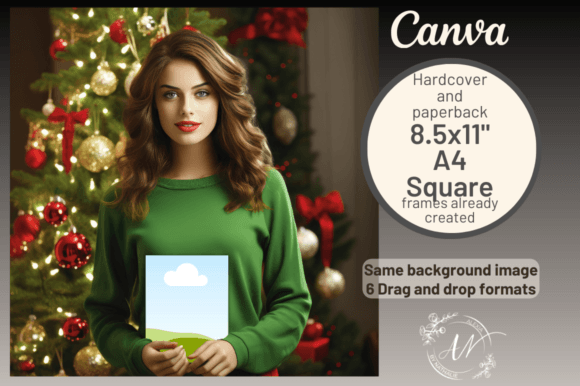
At its core, this tool functions as a sophisticated visual container. The defining characteristic of these frames is the separation of elements—specifically, the inclusion of realistic hands holding the book. Unlike standard static mockups where the book is locked into a specific background, this setup allows for compositional flexibility. The style is grounded in modern, clean photography, avoiding the over-stylized filters that can sometimes date marketing materials quickly. The appeal lies in its authenticity; it mimics the user-generated content style prevalent on platforms like TikTok and Instagram, which often outperforms overly polished corporate graphics in terms of engagement.
The practical application extends across multiple facets of the publishing industry. Whether you are working on editorial design for a magazine feature or creating assets for packaging design concepts, the ability to manipulate layers is crucial. For a children’s book author, the square format (4092 x 4092px) is particularly effective. It allows the cover art to breathe, ensuring that typography and illustration details remain legible even when scaled down for mobile viewing. The "drag and drop" functionality within Canva means you are not wrestling with complex clipping masks in Photoshop; you are simply arranging a scene.
Integrating Frames into Your Brand Identity
Consistency is the bedrock of a strong brand identity. When you utilize KDP Book Mockup Canva Frames, you are doing more than just displaying a product; you are establishing a visual language for your publishing brand. If you are a low-content book creator—designing journals, planners, or coloring books—your output is high volume. You need a system that allows you to churn out promotional graphics that look uniform and professional.
Consider the social media graphics required for a launch. You need assets for Pinterest pins, Instagram stories, and Facebook covers. By using the different template layouts provided (A4, letterhead, and square), you can maintain visual consistency across platforms. The lighting and shadows in the mockup remain constant, so even if your book covers change, the "stage" they sit on remains part of your brand. This approach elevates your perception from a hobbyist to a serious publisher. It creates a cohesive look that signals reliability to potential buyers, which is a key component of modern typography and marketing strategy.
Strategic Use Across Digital Platforms
The versatility of this asset is most evident when you look at the specific requirements of different digital channels. On Amazon, specifically for A+ Content, the goal is to reduce bounce rates and increase conversion. A flat image of a book cover often fails to convey the physicality of the product. However, a mockup showing the book in hand, or resting on a table with natural shadows, helps the customer visualize ownership. It adds a tactile dimension to a digital storefront.
Outside of the marketplace, the frames serve as powerful design assets for web design integration. If you have an author landing page, these mockups can break up long blocks of text, providing visual relief while reinforcing your product offering. For content creators and bloggers, the frames can be used to illustrate tutorials or reviews. Instead of linking to a generic Amazon image, you can embed a stylized version of the book that fits your site's aesthetic. This level of customization is rarely available with standard stock photography.
Technical Execution and Readability
While the visual appeal is immediate, the technical execution of the template ensures high-resolution output. The 4092px dimension is ample for high-DPI displays, ensuring that your logo design elements or intricate cover details do not pixelate. This is vital for packaging design previews where texture and detail are selling points.
When using these frames, pay attention to the interplay between the mockup and your own cover art. If your book cover utilizes a heavy serif font or a complex script font, ensure the background of the mockup does not compete with it. The neutral tones of the "KDP Book Mockup Canva Frames" are designed to be adaptable, but contrast is key. For example, if you are advertising a dark thriller, a lighter background frame helps the book pop. Conversely, a vibrant children's book might benefit from a minimalist background to let the colors shine.
Choosing the Right Layout
The inclusion of seven different layouts offers a solution for almost every publishing format. However, choosing the right one requires a strategic eye.
- The Square Layout: Best for Instagram feeds and general social media advertising. It centers the focus and works well with the "hands holding book" element, creating an intimate, personal connection with the viewer.
- The A4/Letterhead Layout: Essential for email headers, website banners, or Amazon A+ content modules. These horizontal formats allow for text placement alongside the image, facilitating font pairing opportunities where you can add taglines or reviews next to the visual.
- The Size Independent Template: This is your utility player. Use this when you need to fit the mockup into an irregular space, such as a sidebar widget or a specific print advertisement layout.
Final Thoughts on Utility
Ultimately, KDP Book Mockup Canva Frames represents a shift towards accessible premium font and design tools. It democratizes the ability to create high-quality advertising. For the self-publishing author, it removes the barrier to entry for professional marketing. For the graphic designer, it offers a quick-turnaround solution for client presentations. By focusing on realism and ease of use, these frames ensure that the focus remains exactly where it should be: on the book itself.