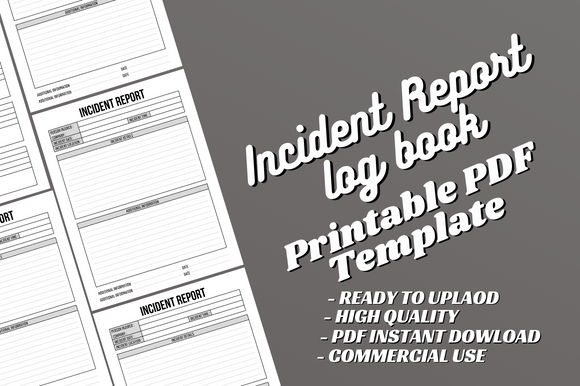
Incident Report Logbook: A Canva Template for Professional Records
Keeping accurate records of workplace incidents, accidents, or unexpected events isn't just good practice—it's often a legal and operational necessity. Yet, many businesses and organizations struggle with inconsistent documentation, lost paperwork, or disorganized digital files. A standardized system transforms this chaos into clarity. The Incident Report Logbook - Canva Template offers a straightforward, professional solution designed specifically for this purpose. It's more than just a blank notebook; it's a structured tool built to help you maintain order and compliance with minimal fuss.
Designed for Clarity and Ease of Use
This template's visual personality is defined by its clean, uncluttered, and functional layout. It avoids decorative flourishes in favor of a structured grid and clear typographic hierarchy. Think of it as a reliable sans serif font in a sea of decorative script—prioritizing legibility and direct communication. The overall appeal lies in its professionalism. It doesn't distract; it directs. Each page is intuitively organized to guide the user through the necessary fields for documenting an incident: date, time, individuals involved, description, actions taken, and follow-up. This logical flow is crucial for ensuring no critical detail is overlooked during a stressful situation.
As a print-ready design with dimensions of 8.5x11 inches, it meets standard letter-size requirements, making it perfect for physical binders or filing cabinets. The 120-page length provides ample space for ongoing documentation. The real power, however, comes from the included editable Canva source file. This is where the template shifts from a static product to a flexible design asset. You're not locked into the original text or fonts. Need to add your company logo? Change a header to match your brand identity? Add a specific field unique to your industry? The Canva file allows for all of this customization, making it a truly adaptable tool for any organization.
Practical Applications Across Industries
Where does an Incident Report Log Book template like this work best? Its applications are broad, fitting seamlessly into various operational contexts. For small business owners, it's a cornerstone for risk management. A restaurant can log kitchen injuries or customer complaints; a retail store can document shoplifting incidents or equipment malfunctions. The consistent format ensures that every report is complete, which is invaluable for insurance claims or internal reviews.
Entrepreneurs and startup teams will find it essential for building professional processes from the ground up. Using this template establishes a culture of accountability and documentation early on. For marketers and content creators working with clients or managing events, it can be adapted to log project setbacks, client feedback discrepancies, or event mishaps, providing a clear paper trail for difficult conversations.
The template also serves publishers and designers who need to track errors in print runs, distribution issues, or client revision histories. Its function as an Incident Log extends beyond physical accidents to any event that deviates from the plan and requires recording. The professional design ensures that the log itself looks credible when presented to stakeholders, auditors, or insurance representatives. It influences perception by demonstrating that your organization takes incident management seriously and handles it with modern typography and organized systems.
Customization and Integration with Your Brand
The true value of the editable Canva file is the ability to make this Incident Report Form an extension of your brand identity. A cohesive brand extends to all internal documents, not just customer-facing materials. By customizing the template, you reinforce consistency and professionalism throughout your operations.
Here’s a practical approach to implementing this template:
- Evaluate Your Needs: Before editing, review the existing fields. Do you need to add a section for witness signatures, equipment serial numbers, or regulatory codes? Plan these additions first.
- Customize in Canva: Upload your logo, adjust the color scheme to match your brand palette, and consider the font pairing. While the template uses a clear sans serif font for body text, you might choose a complementary serif font or a bold display font for headers to add a touch of personality while maintaining readability. Always prioritize clarity over style for a document of this nature.
- Test the Flow: Print a sample page or view it digitally. Is the text size comfortable for quick writing? Is there enough space in each field? Readability considerations are paramount. A well-designed form reduces errors and speeds up the reporting process.
- Understand the License: This template is provided with a commercial license, allowing you to use the customized version for your business or organization without additional fees. This makes it a cost-effective premium font and design solution compared to hiring a designer to create a logbook from scratch.
Think of this logbook not as a mere creative font or decorative asset, but as a foundational operational tool. Its high-quality print-ready design ensures it looks sharp in any context, from a manager's desk to a safety officer's clipboard. The absence of bleed means it's optimized for standard printing, avoiding the hassle of trimming. Remember, this is an interior template only; you will need to create your own cover before uploading to platforms like Amazon KDP if you choose to publish it. However, for direct business use, the interior is the complete, functional product.
In a digital age, a tangible, well-organized logbook can be a surprisingly powerful tool. It provides a physical backup, a quick-reference guide, and a sense of procedural gravity that a scattered digital file sometimes lacks. By choosing a structured and editable template like the Incident Report Logbook - Canva Template