Mastering the Daily Journal Canva Template for Creative Business
There is a specific kind of magic that happens when you open a new planner or journal. The crisp pages represent potential—potential for organization, creativity, and structure. However, creating that structure from scratch is often the hardest part of the design process. This is where the Daily Journal Canva Template steps in, not just as a digital file, but as a comprehensive framework for productivity and business growth.
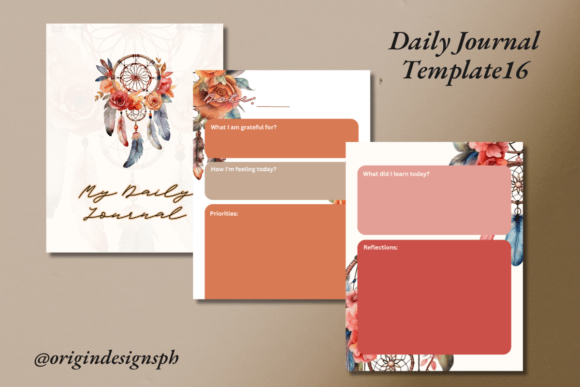
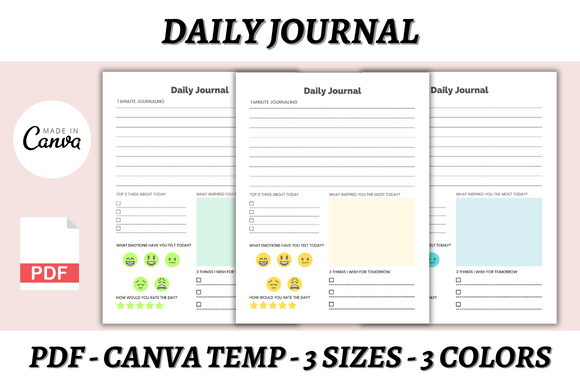
At its core, this template is an editable design asset built within Canva, a free-to-use online graphic design tool. It is not merely a static PDF; it is a malleable set of design assets comprising three distinct sizes: A4, A5, and US Letter. This versatility ensures that whether you are creating a digital download for an iPad user or a printable physical product for a stationery enthusiast, the dimensions are already optimized. The visual style of the template strikes a balance between modern minimalism and functional warmth. It relies on clean lines and intuitive layouts that guide the eye naturally from morning tasks to evening reflections, ensuring that the user experience is seamless.
The Business Case for "Done-for-You" Design Assets
For entrepreneurs, Etsy shop owners, and content creators, time is the most finite resource. The concept behind the Daily Journal Canva Template is rooted in efficiency. By utilizing a pre-made framework, you bypass the grueling hours spent on layout design, grid alignment, and typography selection. Instead, you can focus on the creative aspects that truly define your brand identity.
The true value of this asset lies in its "Done-for-You" nature. You are purchasing a launchpad. The heavy lifting of structural design—ensuring margins are print-ready and elements are properly aligned—has been handled by a professional. This allows you to inject your own personality immediately. You can swap out the color palette to match your brand’s hex codes, upload your own logo, and tweak the font styles to match your visual voice. This level of customization transforms a generic planner into a proprietary product that you can sell on your own website, Shopify, or Gumroad. It shifts the dynamic from being a consumer of design to a publisher of high-quality products.
Visual Hierarchy and Readability in Journal Design
A journal is more than just lines on a page; it is a tool for clarity. The layout of the Daily Journal Canva Template is designed to enhance readability and visual hierarchy. In the world of editorial design, how information is organized dictates how it is used. This template utilizes a logical flow that separates daily schedules, priority lists, and notes into distinct zones. This prevents cognitive overload for the end-user, making the product feel helpful rather than cluttered.
When you edit these templates, understanding the role of typography is crucial. While the template comes with suggested fonts, you have the freedom to experiment with different typefaces. For a professional, corporate look, you might lean towards a sans serif font for headers to convey modernity and efficiency. Conversely, if your target audience is looking for something more personal or artistic, incorporating a script font or a handwritten font for headers can soften the aesthetic and add a human touch. The ability to mix a serif font for body text with a bold display font for titles creates a rhythm on the page that makes the journal a pleasure to use.
Practical Applications for Designers and Marketers
The versatility of the Daily Journal Canva Template extends far beyond personal planning. For graphic designers and brand strategists, this file serves as a case study in layout and composition. By deconstructing the layers in Canva, you can observe how professional designers manage white space and align elements. It is an educational tool as much as a functional one.
For marketers and social media managers, the template offers a content goldmine. You can use the design elements to create "behind-the-scenes" content for Instagram or Pinterest, showcasing your planning process to build trust with your audience. Furthermore, the Daily Journal Canva Template can be repurposed into lead magnets. A simplified version of the daily spread can be offered as a free PDF download to grow your email list, serving as a low-barrier entry point to your paid products.
Customizing for Brand Consistency and Monetization
One of the most significant advantages of using Canva is the accessibility of design tools. You do not need advanced software knowledge to modify the Daily Journal Canva Template. The platform allows you to edit fonts, sizes, colors, and layout styles with just a few clicks. This ease of use is vital for maintaining brand consistency across your digital and print products.
When preparing the template for sale, consider the end-user experience. The product includes PDF files alongside the Canva links, ensuring that customers who are less tech-savvy can still print the journal easily. As a seller, you can bundle these sizes (A4, A5, and US Letter) to increase the perceived value of your offering. By adding your unique design flair—perhaps by integrating specific icons or changing the background textures—you create a premium font and design package that stands out in a crowded marketplace.
Ultimately, the Daily Journal Canva Template is more than just a digital download; it is a business tool. It empowers creators to produce high-quality, professional products without the overhead of hiring a design agency. By leveraging this editable framework, you can streamline your workflow, establish a strong visual identity, and build a profitable product line that resonates with an audience seeking order and inspiration in their daily lives. Whether you are a seasoned designer looking for a shortcut or a small business owner building your first digital product, this template provides the foundation you need to succeed.