Transform Your Recipes with a Canva Cookbook Template
A Practical Design Tool for Modern Food Creators
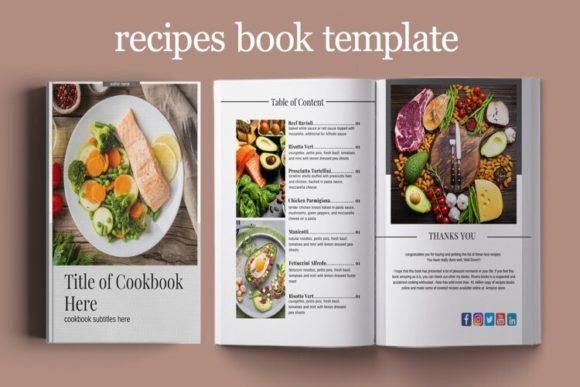
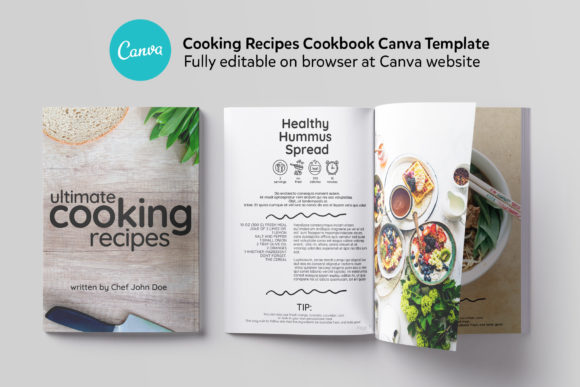
For food bloggers, chefs, and Instagram creators, the leap from a great recipe to a polished, professional publication often feels daunting. The Cooking Cookbook Canva Template bridges that gap. This isn't a complex design software requiring a steep learning curve; it's a 24-page, fully editable digital asset built directly in Canva. Its visual personality is clean, modern, and inviting, designed to make your food photography the hero. The style leans towards contemporary editorial design, using a balanced mix of elegant serif fonts for headings and clear sans-serif typefaces for body text, ensuring both beauty and readability. The overall appeal lies in its structured flexibility—it provides a proven, professional framework that you can instantly personalize with your brand's colors, fonts, and images.
Where This Template Truly Shines
The strength of this Canva Recipe Book template is its versatility across projects. For a food blogger, it's the fastest path to creating a lead magnet PDF or a sellable digital product. A chef can use it to design a signature menu or a client gift. Instagram content creators will find the unique recipe layouts perfect for carousels and downloadable guides that grow their email list. Beyond digital, the A4 size (210x297 mm) is print-ready, making it ideal for small-batch cookbook printing, restaurant collateral, or workshop handouts. The design's adaptability means it can be dressed up for a luxury bakery brand or kept minimalist for a health-focused meal prep service, influencing brand perception through consistent, high-quality visuals.
Using the Cooking Cookbook Canva Template directly impacts your content's effectiveness. The carefully considered visual hierarchy guides the reader's eye from the title to the ingredient list to the method, improving comprehension. This structured approach to modern typography—pairing a display font with a highly legible sans-serif—enhances professionalism and audience engagement. A well-designed template ensures your brand identity is communicated clearly on every page, building recognition and trust. It transforms a simple recipe into an experience, making your content feel more valuable and shareable.
Getting the Most from Your Design Asset
When you download the template, you receive a ZIP file containing a NOTES FILE with direct links to the master templates and a TXT file for photo credits. The process is straightforward: open Canva, click the link, and a copy is saved to your account. This is where your creative strategy begins. First, evaluate the project fit. The six unique recipe layouts are a significant strength. Test them with your existing content. Does a particular layout better suit step-by-step tutorials? Does another showcase your stunning hero shots more effectively? This is about practical application, not just aesthetics.
Next, consider your font pairing and brand consistency. The template uses a premium font combination as a starting point. You can stick with it for instant elegance or swap in your own brand's typeface system. If your brand uses a handwritten font for warmth, consider using it sparingly for accents or chapter titles, while keeping the recipe instructions in a clean sans-serif font for maximum readability. This balance is crucial in editorial design. Remember, the goal is clarity. Test how your chosen fonts look at different sizes within the template's existing frames.
Finally, leverage this design asset for multiple outputs. The same core design can be adapted for social media graphics, a full PDF ebook, or a printed booklet. This consistency strengthens your brand identity across all touchpoints. The included instruction file is key—use the direct links to ensure you're always editing the master template, preserving its quality. By treating this template as a flexible starting point rather than a rigid cage, you unlock a efficient, professional workflow for sharing your culinary passion with the world.